
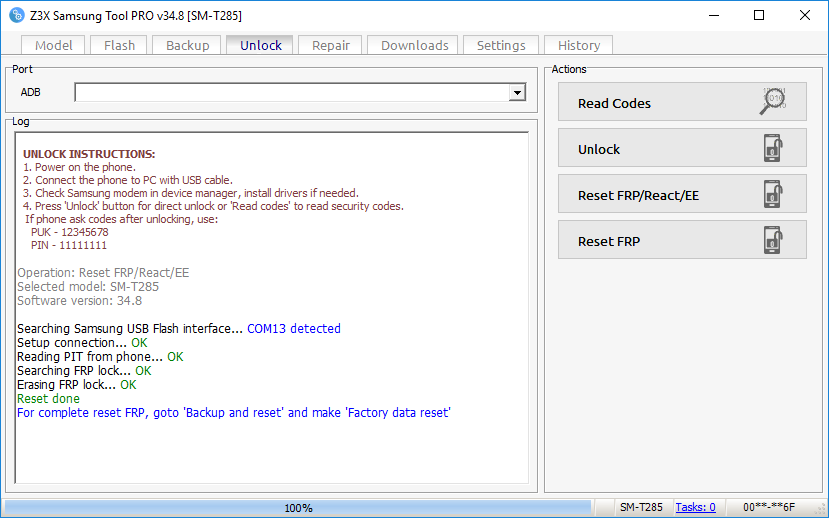
sm-t285 frp reset done
select correct model
UNLOCK INSTRUCTIONS:
1. Power on the phone.
2. Connect the phone to PC with USB cable.
3. Check Samsung modem in device manager, install drivers if needed.
4. Press 'Unlock' button for direct unlock or 'Read codes' to read security codes.
If phone ask codes after unlocking, use:
PUK - 12345678
PIN - 11111111
Operation: Reset FRP/React/EE
Selected model: SM-T285
Software version: 34.8
Searching Samsung USB Flash interface... COM13 detected
Setup connection... OK
Reading PIT from phone... OK
Searching FRP lock... OK
Erasing FRP lock... OK
Reset done
For complete reset FRP, goto 'Backup and reset' and make 'Factory data reset'
Done with Samsung Tool PRO v.34.8
select correct model
UNLOCK INSTRUCTIONS:
1. Power on the phone.
2. Connect the phone to PC with USB cable.
3. Check Samsung modem in device manager, install drivers if needed.
4. Press 'Unlock' button for direct unlock or 'Read codes' to read security codes.
If phone ask codes after unlocking, use:
PUK - 12345678
PIN - 11111111
Operation: Reset FRP/React/EE
Selected model: SM-T285
Software version: 34.8
Searching Samsung USB Flash interface... COM13 detected
Setup connection... OK
Reading PIT from phone... OK
Searching FRP lock... OK
Erasing FRP lock... OK
Reset done
For complete reset FRP, goto 'Backup and reset' and make 'Factory data reset'
Done with Samsung Tool PRO v.34.8
